# EDDM - München

# Important for Cross the Land 2024 - arrival

Servus and welcome to München! We are glad to have you visit our airport as part of the event. This page contains a few important points that every pilot should take note of, but of course you are always welcome to read our full briefing on the following pages.

### Preparations

Please come equipped with **up to date** charts. These are available from commercial outfits like Navigraph, but also Chartfox, where you can find **free** charts such as the [ground chart](https://chartfox.org/eddm#a774c0cc-6b0b-4514-af0a-36c0608ea762) and [parking chart](https://chartfox.org/eddm#67f1b94e-6cb2-417d-b997-906ae0151a24). Especially if this is your first time visiting, please take a moment to familiarize yourself with the airport.

### Arrival Procedures

You can <span style="color: rgb(224, 62, 45);">expect to be cleared for one of the four **RNAV transitions, or waypoints on these transitions,**</span> available for each runway direction:

<table border="1" id="bkmrk-rnav-transition-%28cli" style="border-collapse: collapse; width: 100%; border-width: 1px; height: 145.992px;"><colgroup><col style="width: 50.0618%;"></col><col style="width: 50.0618%;"></col></colgroup><tbody><tr style="height: 29.7969px;"><th style="height: 29.7969px;">**RNAV Transition (click to open charts)**</th><th style="height: 29.7969px;">**In your FMC likely abbreviated as**</th></tr><tr style="height: 35.3984px;"><td style="height: 35.3984px;">[LANDU08](https://chartfox.org/eddm#70e92c79-9c4d-43ff-813d-d17d64748d1a) / [LANDU26](https://chartfox.org/eddm#dc1d7e4f-b471-4690-9ec3-6da1e9e7b3fa)</td><td style="height: 35.3984px;">LAN08 / LAN26</td></tr><tr style="height: 10px;"><td style="height: 10px;">[NAPSA08](https://chartfox.org/eddm#2d5600c5-b8ca-4346-ad90-64ea18dd5ceb) / [NAPSA26](https://chartfox.org/eddm#857ab2a4-ccb3-4b6e-be6e-9b47752fb710)</td><td style="height: 10px;">NAP08 / NAP26</td></tr><tr style="height: 35.3984px;"><td style="height: 35.3984px;">[BETOS08](https://chartfox.org/eddm#2d5600c5-b8ca-4346-ad90-64ea18dd5ceb) / [BETOS26](https://chartfox.org/eddm#857ab2a4-ccb3-4b6e-be6e-9b47752fb710)</td><td style="height: 35.3984px;">BET08 / BET26</td></tr><tr style="height: 35.3984px;"><td style="height: 35.3984px;">[ROKIL08](https://chartfox.org/eddm#70e92c79-9c4d-43ff-813d-d17d64748d1a) / [ROKIL26](https://chartfox.org/eddm#dc1d7e4f-b471-4690-9ec3-6da1e9e7b3fa)</td><td style="height: 35.3984px;">ROK08 / ROK26</td></tr></tbody></table>

##### **<span style="color: rgb(224, 62, 45);">STARs, such as BETOS1A are not used, you will <span style="text-decoration: underline;">not</span> fly via OTT or MIQ.</span>**

<span style="color: rgb(0, 0, 0);">You can find the RNAV transitions a bit hidden in the VIAS selection of your FMC. Do not select a STAR beforehand, if you already have, select "NO STAR" to clear the selection.</span>

[![eddm-rnav-2.jpg](https://knowledgebase.vatsim-germany.org/uploads/images/gallery/2023-08/scaled-1680-/eddm-rnav-2.jpg)](https://knowledgebase.vatsim-germany.org/uploads/images/gallery/2023-08/eddm-rnav-2.jpg)![eddm-rnav-3.jpg](https://knowledgebase.vatsim-germany.org/uploads/images/gallery/2023-08/scaled-1680-/eddm-rnav-3.jpg)

Expect directs to waypoints not contained in your flight plan! You can manually enter waypoints on your FMC's DIRECT TO page (for instance explained [here](https://docs.flybywiresim.com/pilots-corner/beginner-guide/takeoff-climb-cruise/#5-cruise) by FlyByWire for their A32NX).

**Should you be unable to follow any of the instructions, you must report that fact to your controller as soon as possible!**

### Director

Your final approach turn will be directed by a station called München Director—hence the name. As timely communication is crucial in the final stage of your approach, **you are to <span style="color: rgb(224, 62, 45);">limit your initial call with Director to your call sign only, do <span style="text-decoration: underline;">not</span> include any heading, direct, or current or cleared altitude:</span>**

> <span style="color: rgb(0, 0, 0);">**München Director, Lufthansa 123.**</span>

### Vacating

After your safe and hopefully buttered landing, please make sure you **fully** vacate the runway without delay:  
**<span style="color: rgb(224, 62, 45);">You are only fully vacated after crossing the stopbar of the holding point.</span>**

<span style="color: rgb(0, 0, 0);">For the event, we will have Ground controllers who take you from the runways to the apron. Switch on your own after vacating:</span>

<table border="1" id="bkmrk-after-landing-on-the" style="border-collapse: collapse; width: 100%;"><colgroup><col style="width: 50%;"></col><col style="width: 50%;"></col></colgroup><tbody><tr><td>After landing on the northern runway (26R / 08L)</td><td>EDDM\_N\_GND: 121.980</td></tr><tr><td>After landing on the southern runway (26L / 08R)</td><td>EDDM\_S\_GND: 121.830</td></tr></tbody></table>

### <span style="color: rgb(0, 0, 0);">Missed approach</span>

<span style="color: rgb(0, 0, 0);">If our hopes for a safe landing were a bit premature, follow the missed approach procedures as published unless instructed otherwise. **The go-around altitude is always 5000ft.** Please avoid climbing higher to avoid conflicts. Prepare to hold at MIQ or OTT for a bit while we make room in the traffic stream for you to approach again.</span>

### <span style="color: rgb(0, 0, 0);">Parking</span>

München Apron is controlled, so wait for clearances for all of your movements on the apron. When you have reached your gate, and your journey ends in München, we kindly ask you not to delay your disconnection from VATSIM to give pilots coming in after you a chance to find an open gate. Reporting on-block, shutting down, or closure of the flight plan is not required.

### Feedback

We hope you had an amazing time during your visit and you will include EDDM in your future flight adventures. If there is anything you would like to share with us please do not hesitate to do so at [https://feedback.vatger.de/](https://feedback.vatger.de/)

# Briefing for Cross the Land 2025

Servus and welcome to München! We are glad to have you visit our beloved airport as part of the event. This page contains a few important points that every pilot should take note of, but of course you are always welcome to read our full briefing on the following pages.

### Preparations

Please come equipped with **up to date** charts and navigational data. These are available from commercial outfits like Navigraph, but also Chartfox, where you can find **free** charts such as the [ground chart](https://chartfox.org/eddm#a774c0cc-6b0b-4514-af0a-36c0608ea762) and [parking chart](https://chartfox.org/eddm#67f1b94e-6cb2-417d-b997-906ae0151a24). Especially if this is your first time visiting, please take a moment to familiarize yourself with the airport before the event.

Also, be sure to have up to date [scenery](https://knowledgebase.vatsim-germany.org/books/airports-munchen-fir-edmm/page/charts-and-scenery). If you use GSX, be sure to have an up-to-date profile.

<p class="callout info">**Using MSFS2024 and Aerosoft/Simwings?** With SU3, some disabled sceneries might have been re-enabled. Ensure that the bundled GAYA scenery is disabled.</p>

### Choosing a Gate

<p class="callout info">Due to ongoing construction on **Apron 1,** please do not spawn on positions **101–109** and **141–144.** </p>

Appropriate Gates for A388: 113X, 250, 224, 247, 317, 318, Apron 35 (southern part), Apron 6. Do not use 301 or 302.

Please make extensive use of all available aprons.

### Receiving IFR Clearance

##### <span style="color: rgb(224, 62, 45);">Request clearance via Datalink!</span>

En-route clearance is preferably given via Datalink (PDC/DCL via [Hoppie ACARS System](https://www.hoppie.nl/pub/ "Hoppie ACARS System")), the station name is **`EDDM`**. If you don't have an aircraft with integrated CPDLC/PDC function you can use the stand-alone tool **[easyCPDLC](https://github.com/josh-seagrave/EasyCPDLC/releases "github.com")**. As a last resort, clearance is given via voice.

##### Departure Slots and Startup Time

For this event, you have been given a slot time (CTOT) at which you are expected to depart. When requesting clearance, you will be issued with a TSAT (Target Startup Approval Time) which is scheduled before your slot time to allow pushback and taxi. You must ensure that you will be ready at this time to start pushback or start your engines for taxi out.

<p class="callout warning">To avoid frequency congestion on Delivery, **request startup earliest 5 minutes before your assigned TSAT.** When being asked to "stand by" on Delivery, do not read back, maintain a **listening** watch on frequency, like in Hollywood, **we will call you.**</p>

##### The phrase "startup approved"

The clearance "startup approved" carries a special meaning in Germany. **It is absolutely <span style="color: rgb(224, 62, 45);">not a clearance to push back!</span>** **Delivery will <span style="text-decoration: underline;">never</span> give push-back approval.**

When at a push-back stand, start the APU, disconnect ground equipment and call the push-back truck.

When at a taxi-out stand, you may start engines with this clearance.

##### Initial Climb

**All** standard instrument departures out of Munich have an **initial climb clearance of FL070, on standard altimeter setting of QNH1013.**

<table border="1" id="bkmrk-when...-do...-depart" style="border-collapse: collapse; width: 100%; height: 89.4px;"><colgroup><col style="width: 50%;"></col><col style="width: 50%;"></col></colgroup><thead><tr><td>**when...**</td><td>**do...**</td></tr></thead><tbody><tr style="height: 29.8px;"><td style="height: 29.8px;">departing</td><td style="height: 29.8px;">begin climb as published on the SID</td></tr><tr style="height: 29.8px;"><td style="height: 29.8px;">reaching 5000ft (Transition Altitude)</td><td style="height: 29.8px;">switch altimeter to standard (or QNH 1013)</td></tr><tr style="height: 29.8px;"><td style="height: 29.8px;">reaching FL070</td><td style="height: 29.8px;">stop climb and maintain FL070 unless climb clearance received</td></tr></tbody></table>

##### Departure Runway

<p class="callout info">**We will balance departures to use both runways. You might be assigned non-standard departures, be sure to pay attention to the SID designator and runway and ensure the correct SID is programmed in your FMC!**</p>

**Each SID designator refers to <span style="text-decoration: underline;">exactly one</span> runway,** refer to your charts for details. <span style="color: rgb(224, 62, 45);">**Exact adherence to the cleared procedure is absolutely required.**</span>

##### Handoff

**Listen carefully** for the **correct Apron frequency** you need to contact next—there are three separate Apron frequencies, and not to be confused with München Ground.

### Apron operations

<p class="callout info">**Starting on the main apron 2** (parking positions 201–224 or 244–256)? Unless instructed otherwise, when cleared for pushback **use the closest line behind you** (W2 or E2). **<span style="color: rgb(224, 62, 45);">Never push onto Center 2</span>,** as this blocks the whole apron for heavy aircraft.</p>

<p class="callout warning">**When requesting push-back, we need you to commence immediately.** So, only request when fully ready with chocks removed and truck connected.</p>

##### Special Procedures

- **Colored lines** (blue and orange) are used most of the time when available for medium aircraft.
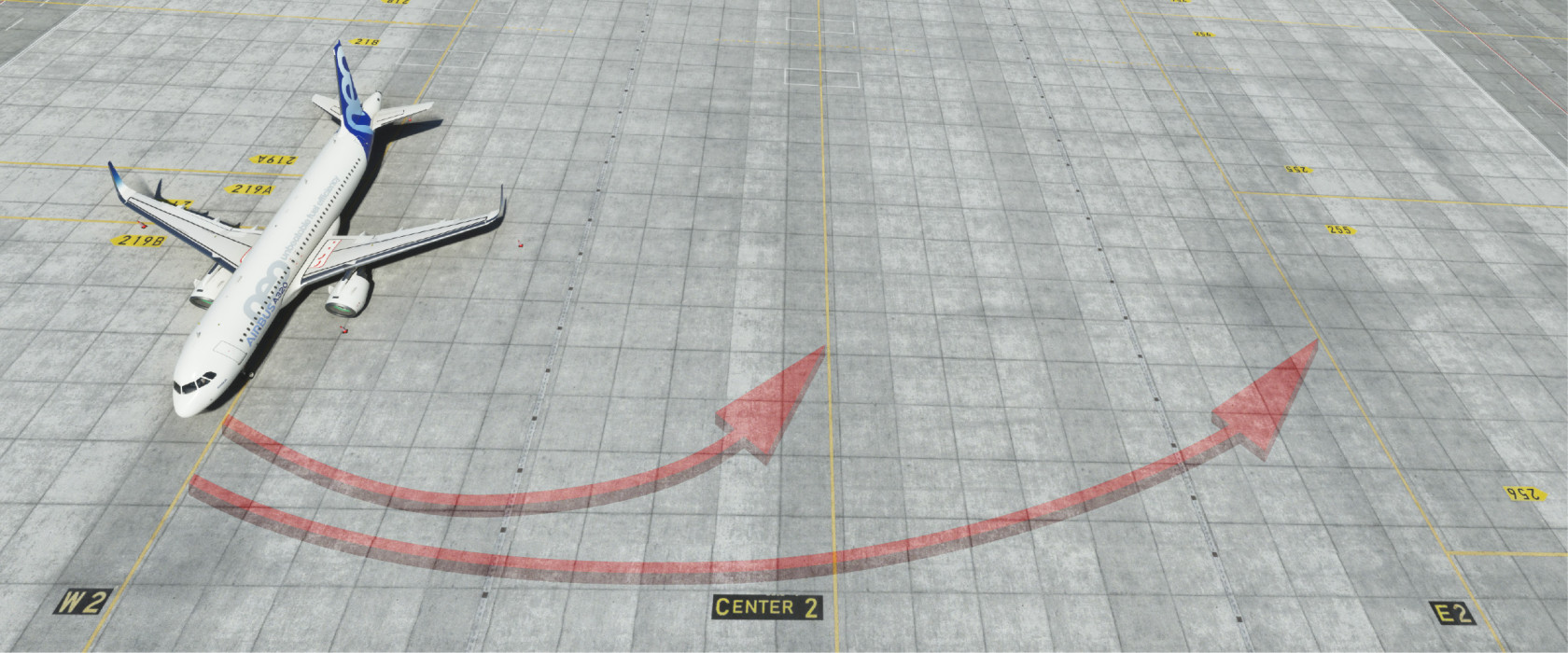
- You might get **pushed facing away from your departure runway** (e.g. facing south for runway 26R), you can expect a **U-Turn or "180 degree turn"** for taxi. These U-Turns should be performed on your present position, **you do not need to follow the taxi lanes.** If instructed to "pick up" another line, do so like this:

[![EDDM-180.jpg](https://knowledgebase.vatsim-germany.org/uploads/images/gallery/2023-04/scaled-1680-/eddm-180.jpg)](https://knowledgebase.vatsim-germany.org/uploads/images/gallery/2023-04/eddm-180.jpg)
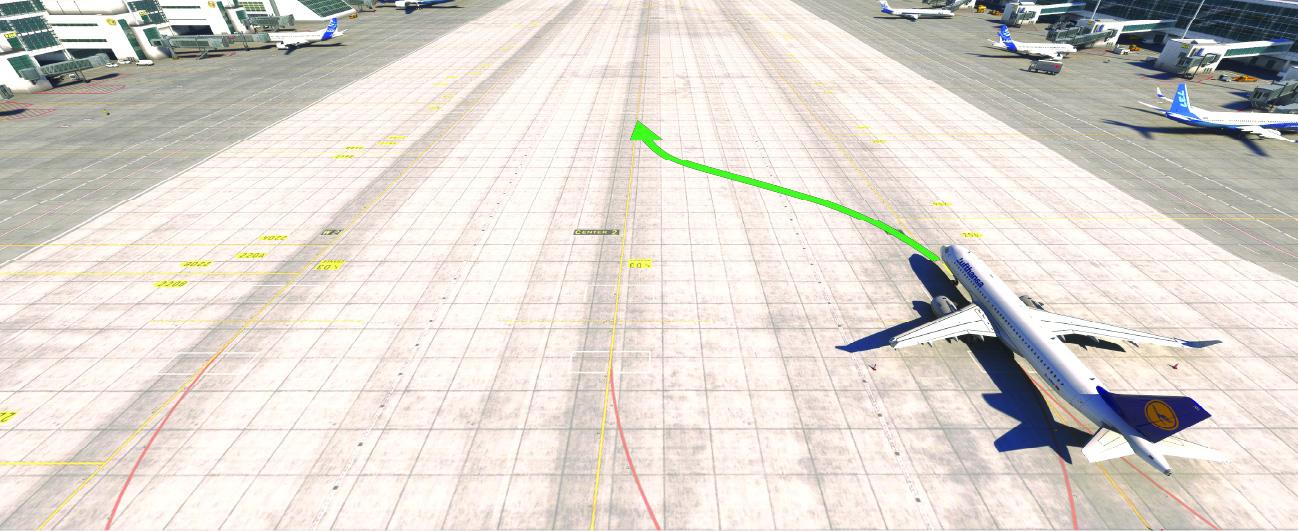
- When instructed to **"swing over" to another taxi lane,** do so immediately, **do not follow the taxiway guidelines:**

**[![eddm-swingover.jpg](https://knowledgebase.vatsim-germany.org/uploads/images/gallery/2025-08/scaled-1680-/eddm-swingover.jpg)](https://knowledgebase.vatsim-germany.org/uploads/images/gallery/2025-08/eddm-swingover.jpg)**
<p class="callout danger">Always **report if you are unable** to comply with the instruction or if you are unsure what to do!</p>

##### Taxi

Your taxi routing towards the departure runway always consists out of two parts. The first taxi instruction will lead you to the so called (apron) **entries** (e.g. N3, N4). **You have to hold at the entry unless instructed otherwise.** Further taxi will be with Ground after a frequency change.

<p class="callout info"><span class="mw-headline">**Entries N1-N4 and S5-S8 are located on bridges.** When cleared for the entry, you can always **taxi onto the respective bridge** and hold there.</span></p>

### Taxiing and Departing

München Ground will guide you from the apron entries to the runway.

##### Handoff to Tower

<p class="callout info">Ground can tell you to "contact Tower" as usual or advise you to "stand by for Tower on ...". <span style="color: rgb(224, 62, 45);">**If instructed to "stand by for Tower" (FAA-speak: "monitor Tower"),**</span> just tune in to the given frequency, **do not call in,** but listen closely—Tower will call you when it’s your turn.</p>

##### Handoff to Departure

**Remain on Tower frequency after departure. You will be handed off by Tower to the departure frequency as charted**—even if it is not listed in your pilot client. Please do not guess the frequency, If unsure, ask!

### Feedback

Now you are on your way to your destinations, we wish you a pleasant journey and a buttered landing! We hope you had an amazing time during your visit and you will include EDDM in your future flight adventures. If there is anything you would like to share with us please do not hesitate to do so at [https://feedback.vatger.de/](https://feedback.vatger.de/)

# Charts and Scenery

**IFR Charts** for Munich Airport are available at [https://chartfox.org/EDDM](https://chartfox.org/EDDM "Charts EDDM") (VATSIM Login required).

**VFR Charts:** We suggest to use [https://www.openflightmaps.org/ed-germany/](https://www.openflightmaps.org/ed-germany/). The [German VFR AIP](https://aip.dfs.de/BasicVFR/pages/C01A58.html) has also recently been made available.

### Airport Scenery

<table border="1" id="bkmrk-sim-freeware-payware" style="border-collapse: collapse; width: 100%; height: 223px;"><tbody><tr style="height: 29px;"><td class="align-center" style="width: 20%; background-color: rgb(194, 224, 244); border-color: rgb(149, 165, 166); border-style: solid; vertical-align: middle; height: 29px;">**Sim**  
</td><td class="align-center" style="width: 40%; background-color: rgb(194, 224, 244); border-color: rgb(149, 165, 166); border-style: solid; vertical-align: middle; height: 29px;">**Freeware**  
</td><td class="align-center" style="width: 40%; background-color: rgb(194, 224, 244); border-color: rgb(149, 165, 166); border-style: solid; vertical-align: middle; height: 29px;">**Payware**  
</td></tr><tr style="height: 67px;"><td class="align-center" style="width: 20%; background-color: rgb(236, 240, 241); border-color: rgb(149, 165, 166); border-style: solid; vertical-align: middle; height: 67px;">**Microsoft Flight  
Simulator 2024**</td><td style="width: 40%; border-color: rgb(149, 165, 166); border-style: solid; vertical-align: middle; height: 67px;">GAYA scenery is included

<span style="color: rgb(22, 145, 121);">With SU1, the bridges have been fixed and can be used.</span>

</td><td style="width: 40%; border-color: rgb(149, 165, 166); border-style: solid; vertical-align: middle; height: 67px;">[Aerosoft / sim-wings](https://www.aerosoft.com/de/microsoft-flight-simulator/msfs-szenerien/3253/sim-wings-munich "Sim-Wings Munich")

<span style="color: rgb(186, 55, 42);">**Be sure to disable the default GAYA scenery otherwise bridges will be glitched!**  
  
Taxiway C3 does not reflect the current real-life situation, with the orange and blue lanes being swapped. Controllers are discouraged from using these lines. Please confirm intended line (left/right) with your controller when use of any colored line of C3 is instructed.</span>

<span style="color: rgb(186, 55, 42);">[GSX Profile](https://flightsim.to/file/38557/sim-wings-eddm-gsx-profile)</span>

</td></tr><tr style="height: 57px;"><td class="align-center" style="width: 20%; background-color: rgb(236, 240, 241); border-color: rgb(149, 165, 166); border-style: solid; vertical-align: middle; height: 57px;">**Microsoft Flight  
Simulator 2020**  
</td><td class="align-center" style="width: 40%; border-color: rgb(149, 165, 166); border-style: solid; vertical-align: middle; height: 57px;">GAYA scenery as part of World Update 18</td><td class="align-center" style="width: 40%; border-color: rgb(149, 165, 166); border-style: solid; vertical-align: middle; height: 57px;">[Aerosoft / sim-wings](https://www.aerosoft.com/de/microsoft-flight-simulator/msfs-szenerien/3253/sim-wings-munich "Sim-Wings Munich")

<span style="color: rgb(186, 55, 42);">**Be sure to disable the default GAYA scenery otherwise bridges will be glitched!**  
  
Taxiway C3 does not reflect the current real-life situation, with the orange and blue lanes being swapped. Controllers are discouraged from using these lines. Please confirm intended line (left/right) with your controller when use of any colored line of C3 is instructed.  
</span>

  
[GSX Profile](https://flightsim.to/file/38557/sim-wings-eddm-gsx-profile)

</td></tr><tr style="height: 35px;"><td class="align-center" style="width: 20%; background-color: rgb(236, 240, 241); border-color: rgb(149, 165, 166); border-style: solid; vertical-align: middle; height: 35px;">**X-Plane 11**  
</td><td class="align-center" style="width: 40%; border-color: rgb(149, 165, 166); border-style: solid; vertical-align: middle; height: 35px;">X-Plane Default Scenery  
</td><td class="align-center" style="width: 40%; border-color: rgb(149, 165, 166); border-style: solid; vertical-align: middle; height: 35px;">[X-Plane Store - SFD](https://store.x-plane.org/EDDM--Munich-Airport_p_935.html "EDDM - Munich Airport - Short Final Destination")  
</td></tr><tr style="height: 35px;"><td class="align-center" style="width: 20%; background-color: rgb(236, 240, 241); border-color: rgb(149, 165, 166); border-style: solid; vertical-align: middle; height: 35px;">**Prepar3D V4/V5**  
</td><td class="align-center" style="width: 40%; border-color: rgb(149, 165, 166); border-style: solid; vertical-align: middle; height: 35px;">--  
</td><td class="align-center" style="width: 40%; border-color: rgb(149, 165, 166); border-style: solid; vertical-align: middle; height: 35px;">[Aerosoft - SimWings](https://www.aerosoft.com/de/flugsimulation/prepar3d-v5/szenerien/p3d-v5-europa/3157/sim-wings-pro-munich "Sim-Wings Munich")</td></tr></tbody></table>

# Departing from Munich

### Preparations

Please come equipped with **up to date** charts and navigational data. These are available from commercial outfits like Navigraph, but also Chartfox, where you can find **free** charts such as the [ground chart](https://chartfox.org/eddm#a774c0cc-6b0b-4514-af0a-36c0608ea762) and [parking chart](https://chartfox.org/eddm#67f1b94e-6cb2-417d-b997-906ae0151a24). Especially if this is your first time visiting, please take a moment to familiarize yourself with the airport before your first flight.

Also, be sure to have up to date [scenery](https://knowledgebase.vatsim-germany.org/books/airports-munchen-fir-edmm/page/charts-and-scenery). If you use GSX, be sure to have an up-to-date profile.

<p class="callout info">**Using MSFS2024 and Aerosoft/Simwings?** With SU3, some disabled sceneries might have been re-enabled. Ensure that the bundled GAYA scenery is disabled.</p>

### Choosing a Gate

<p class="callout info">Due to ongoing construction on **Apron 1,** please do not spawn on positions **101–109** and **141–144.** </p>

**Appropriate Gates for A388:** 113X, 250, 224, 247, 317, 318, Apron 35 (southern part), Apron 6. Do not use 301 or 302.

### <span class="mw-headline" id="bkmrk-delivery-0">Receiving IFR Clearance from Delivery</span>

Call München Delivery for en-route and startup clearance. Your clearance will look something like this:

> **ATC:** *`CALLSIGN`,* (startup approved) cleared to `<em>DESTINATION</em>` `<em>DEPARTURE</em>`, flight planned route, climb via SID to Flight Level 70, squawk `<em>XXXX</em>`.

If you are unable to follow a SID, inform the controller and expect vectors for your departure.

##### The phrase "Startup approved"

##### **"Startup approved"** carries a special meaning in Germany. **It is absolutely not a clearance to push back!** <span style="color: rgb(186, 55, 42);">**Delivery will never give push-back clearance.**</span>

Instead, "Startup approved" means that the airport has the capacity to have your flight depart without delay in the next few minutes, thus you may begin your final departure preparations. Especially when the airport is busy and A-CDM measures are in force, startup is **not** given with your clearance, but at a later time, this is your TSAT, the target startup approval time.

**When at a push-back stand,** and you have received startup approval: Start the APU, disconnect ground equipment and call the push-back truck.

**When at a taxi-out stand,** and you have received startup approval: Start the APU, disconnect ground equipment and start your engines.

##### Initial Climb

##### **All SIDs** out of EDDM have an **initial climb clearance of FL070.**

<p class="callout info">Please note that there is a **difference** between **7000 feet** and **FL070!** As the Transition Altitude is 5000 feet in Germany, your initial climb is "flight level 70" already on standard altimeter settings (QNH 1013)—a precise read-back is appreciated and compliance mandatory to avoid conflicts after departure.</p>

##### Departure Runway

**Each SID designator refers to exactly one runway,** as stated on the charts and below.

Usually, **departures to the north** can expect the **northern runway** while **departures to the south** will depart out of the **southern runway.** You can find a list with the SID fixes and designators for each runway below. Traffic parking at the Cargo Apron can usually expect the southern runway for departures in any direction if traffic allows.

<p class="callout warning">Tools like **SimBrief** are not aware of this and will often give you the **wrong runway and wrong SID**.  
Please ensure you follow the clearance you have received on VATSIM.</p>

<table border="1" id="bkmrk-northern-runway-08l%2F" style="border-collapse: collapse; width: 100%; height: 99.5938px;"><colgroup><col style="width: 16.9482%;"></col><col style="width: 83.0518%;"></col></colgroup><tbody><tr style="height: 57.7969px;"><td class="align-center" style="height: 57.7969px;">Northern Runway

**08L/26R**

</td><td style="height: 57.7969px;">**AKINI, ANKER, EVIVA, GIVMI, INPUD, <span style="color: rgb(224, 62, 45);">MIQ</span>, RIDAR (08L)**

Preferred SID designators: **Q, T** (08L); **N** (26R)

</td></tr><tr style="height: 41.7969px;"><td class="align-center" style="height: 41.7969px;">Southern Runway

**08R/26L**

</td><td style="height: 41.7969px;">**ALG, BIBAG, KIRDI, MERSI, OBAXA, OLASO, ROTAX, <span style="color: rgb(224, 62, 45);">TULSI</span>, TURBU, VAVOR, RIDAR (26L)**

Preferred SID designators: **E, P** (08R); **S, W** (26L)

</td></tr></tbody></table>

**<span style="color: rgb(224, 62, 45);">SIDs marked in red</span> require explicit ATC approval.**

Due to operational reasons, other departure routes may be given (for instance during low-visibility operations).

##### Datalink

En-route Clearance is also available via Datalink (PDC/DCL via [Hoppie ACARS System](https://www.hoppie.nl/pub/ "Hoppie ACARS System")), the station name is **`EDDM`**. You need to call Delivery to request startup thereafter! **Especially during events this procedure is preferred for the en-route clearance.** If you don't have an aircraft with integrated CPDLC/PDC function you can use the stand-alone tool **[easyCPDLC](https://github.com/josh-seagrave/EasyCPDLC/releases "github.com")**.

##### VFR Traffic

Call München Delivery for departure information and to request startup clearance.

##### Handoff

**Listen carefully** to Delivery for the **correct Apron frequency** you need to contact next. There are multiple Apron frequencies, and you may be sent to a cross-coupled frequency that will not appear in your pilot client.

##### De-Icing

If you require de-icing, please let our controllers know with initial contact. De-icing is usually performed at one of three pads near the runway holding points, and not at your stand. Check the ATIS to see if there is a dedicated de-icing coordinator on duty.

### <span class="mw-headline" id="bkmrk-apron-0">Leaving the Gate: Push-back and initial taxi</span>

<p class="callout info">**The Aprons are controlled—as usual in Europe.** Explicit clearances are required for any movements, including push-back.</p>

##### Push-back

As stated above, you will have to contact Apron to obtain clearance to push back. Be sure to make note of our **special procedures** below.

<p class="callout success">**When requesting push-back, we need you to commence <span style="text-decoration: underline;">immediately</span>.** So, only request push-back when fully ready with chocks removed and truck connected.</p>

##### **Starting on the main apron 2** (parking positions 201–224 or 244–256)? Unless instructed otherwise, when cleared for push-back **use the closest line behind you** (W2 or E2).  
<span style="color: rgb(186, 55, 42);">**Never push onto Center 2,**</span> as this blocks the whole apron for heavy aircraft.

##### Special Procedures

**Push-back procedures in Munich might be special for unfamiliar pilots.** Apron can do a lot to increase the efficiency on the ground, so your cooperation is vital.

- **Colored lines** (blue and orange) are used most of the time when available for medium aircraft.
- You might get **pushed facing away from your departure runway** (e.g. facing south for runway 26R), you can expect a **U-Turn** for taxi. These U-Turns should be performed from your present position, **you do not need to follow the taxi lane:**

[![EDDM-180.jpg](https://knowledgebase.vatsim-germany.org/uploads/images/gallery/2023-04/scaled-1680-/eddm-180.jpg)](https://knowledgebase.vatsim-germany.org/uploads/images/gallery/2023-04/eddm-180.jpg)

- In case you get an instruction to **swing over to another taxi lane,** do so immediately, you do not have to follow the taxiway guidelines:

[![eddm-swingover.jpg](https://knowledgebase.vatsim-germany.org/uploads/images/gallery/2025-08/scaled-1680-/eddm-swingover.jpg)](https://knowledgebase.vatsim-germany.org/uploads/images/gallery/2025-08/eddm-swingover.jpg)

<p class="callout danger">Always **report if you are unable** to comply with the instruction or if you are unsure what to do!</p>

##### Taxi

Your taxi routing towards the departure runway always consists out of two parts. The first taxi instruction will lead you to an Apron Entry (e.g. N3, N4, S5, etc.). **You have to hold at the entry unless instructed otherwise.** Further taxi will be with München Ground after a frequency change.

> **ATC:** DLH123 taxi to entry N4 via W2 and D1.

<p class="callout info"><span class="mw-headline">**Entries N1–N4 and S5–S8 are located on bridges.** When cleared for taxi "to" the entry, you can always **taxi onto the respective bridge** and hold there.</span></p>

### <span class="mw-headline" id="bkmrk-ground-0">Getting to the Runway</span>

München Ground will guide you from the apron entries to the runway. The controller might ask you if you are able for an intersection departure. If not, you can always ask the controller to shorten the taxi time.

##### Handoff to Tower

##### If you are instructed to **"stand by for Tower on XXX.XXX",** switch to the frequency as given, but <span style="color: rgb(186, 55, 42);">**do not call in.**</span> Maintain listening watch, tower will call you when it is your turn.

### <span class="mw-headline" id="bkmrk-tower-0">Departing and initial Climb</span>

Tower will finally give you clearance to line up or take off. You are expected to immediately start lining up or departing. Report 'unable' if any issue hinders you from doing so.

##### **Stay on Tower frequency until further advised.**  
  
In most cases, you will be handed off to München Radar **as charted** on your SID chart, to **123.905 (northbound) or 127.955 (southbound).**  
These frequencies may be cross-coupled and may not always appear in your pilot client. **Nonetheless, always tune the frequency as instructed by your controller!**

<p class="callout success">**Reminder: The standard initial climb clearance is FL070.** Unless instructed otherwise, be sure to set your altimeters to "standard" (QNH 1013) when passing 5000ft, and then **level off at FL070** unless you have received other instructions.</p>

# Arriving in Munich

### <span class="mw-headline" id="bkmrk-arrival-0">Arrival</span>

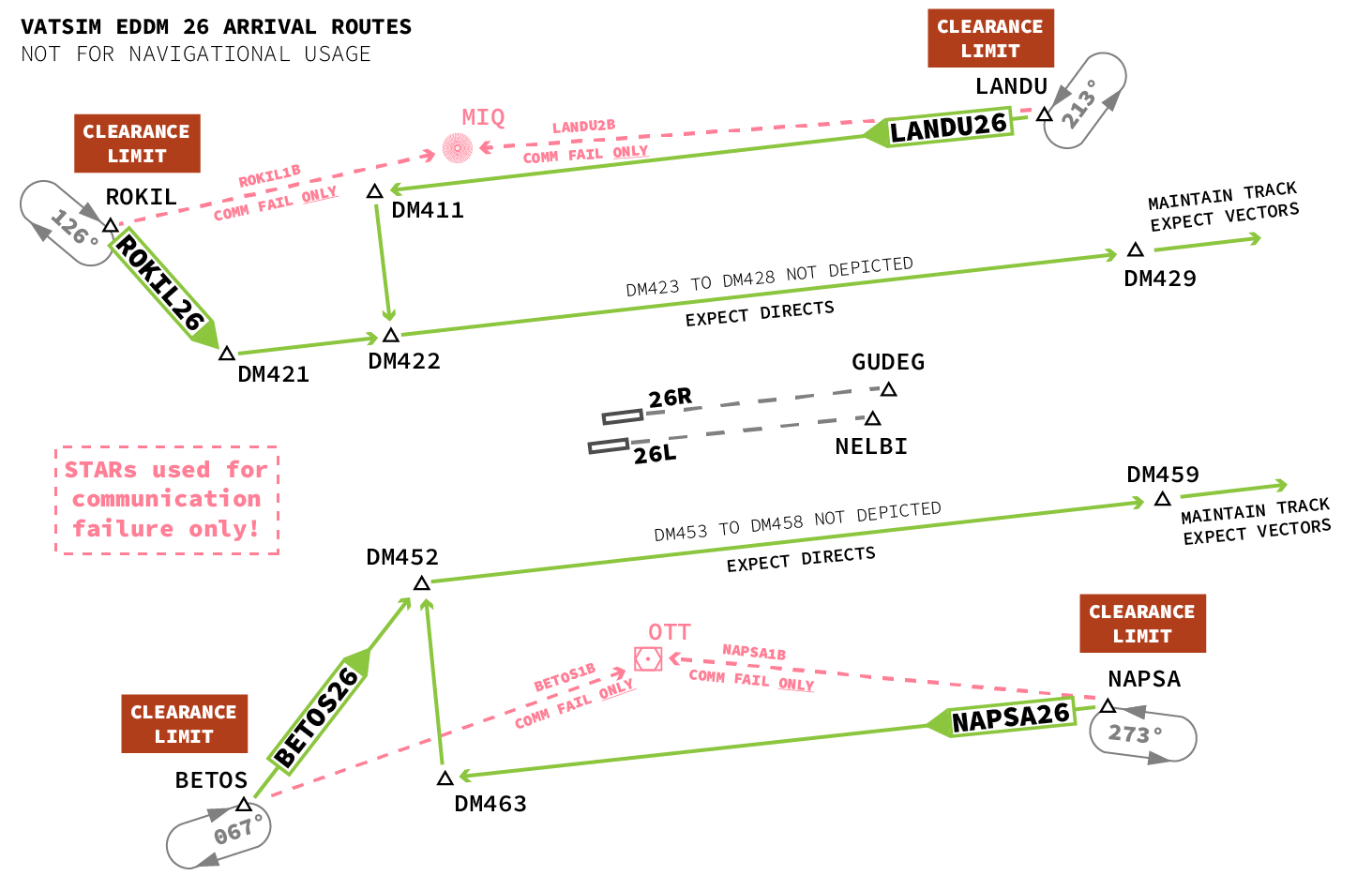
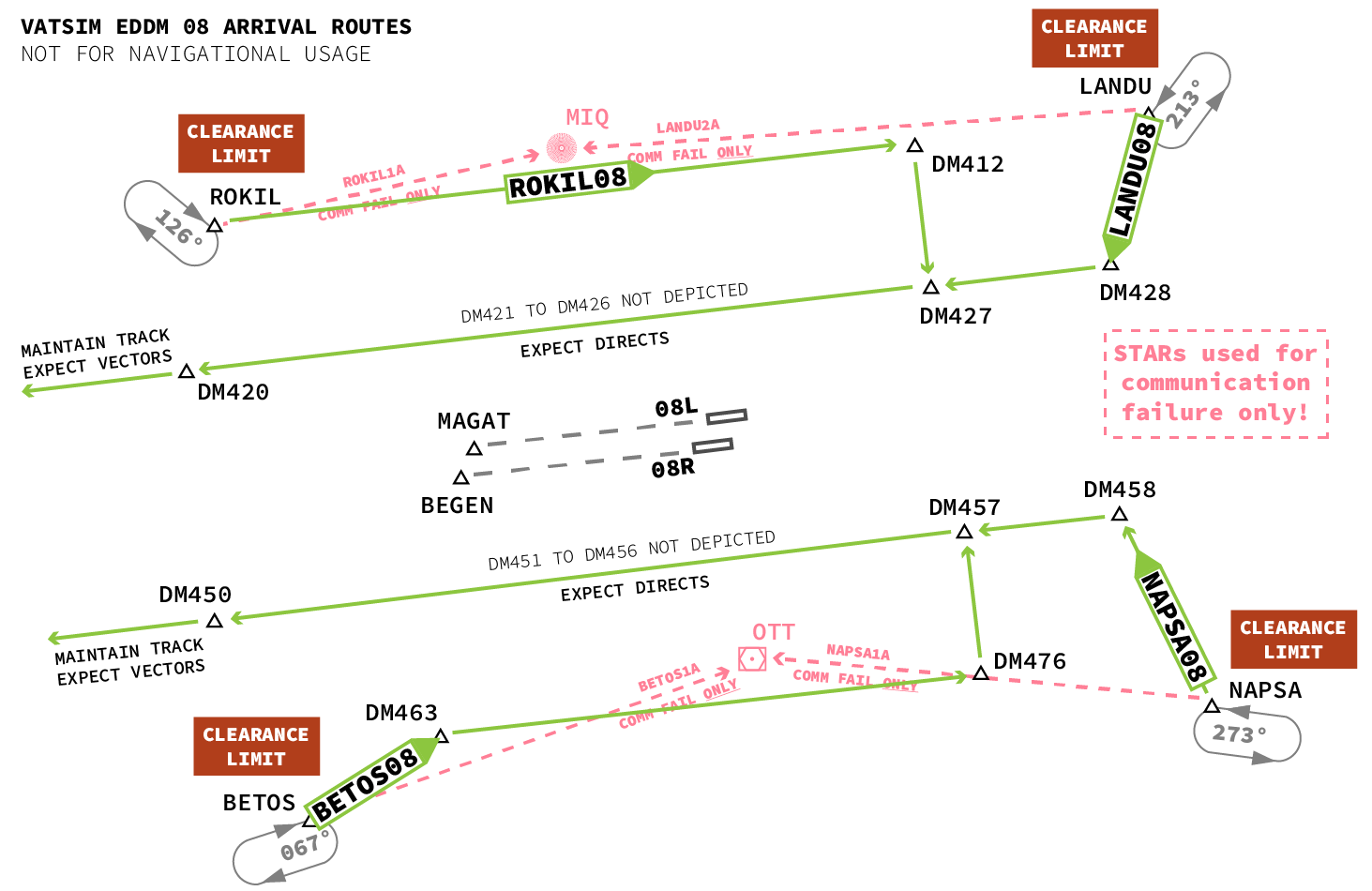
##### Even if your flight plan contains a STAR, **your en-route clearance ends at `ROKIL`, `LANDU`, `BETOS`, or `NAPSA`, as these waypoints are "clearance limits"!  
  
<span style="color: rgb(186, 55, 42);">You are not and</span>**<span style="color: rgb(186, 55, 42);"> **will** **not be cleared** **to continue on any STAR** to `MIQ` or `OTT`.</span>  
  
**If you receive no further clearance** when approaching the limits, **hold** at the respective clearance limit **as published** (details are noted in the section *Arrival Details* below).

#### Expected Arrival Procedures

##### **<span style="color: rgb(186, 55, 42);">Expect RNAV transitions or directs for downwind.  
Do <span style="text-decoration: underline;">not</span> fly any STAR even if you have filed it!</span>**   
When cleared for a transition:  
In your FMC, select **NO STAR,** then on the **VIA/TRANS** page or section:  
  
Runways **08L and 08R:  
ROKIL08** \[ROK08\]**, LANDU08** \[LAN08\]**, BETOS08** \[BET08\]**, NAPSA08** \[NAP08\]  
  
Runways **26L and 26R:**  
**ROKIL26** \[ROK26\]**, LANDU26** \[LAN26\]**, BETOS26** \[BET26\]**, NAPSA26** \[NAP26\]  
  
**From `ROKIL` and `LANDU`, expect 08L or 26R** (northern runway).  
**From `BETOS` and `NAPSA`, expect 08R or 26L** (southern runway).  
  
**Instead of the full transitions, you can also expect directs to shorten the procedures  
(e.g. "<span style="color: rgb(186, 55, 42);">DM422, (thereafter) DM429</span>" for ROKIL26)**  
  
<span style="color: rgb(186, 55, 42);">**Expect radar vectors to final thereafter. You will <span style="text-decoration: underline;">not</span> approach via `MIQ` or `OTT`.**</span>

<span class="mw-headline">The STARs have letters in their designators (e.g. BETOS 1A) and are only used for communication failure and other non-standard situations – even though they technically have to be filed in Germany.</span>

##### <span class="mw-headline">26 Operations</span>

[![EDDM 26.png](https://knowledgebase.vatsim-germany.org/uploads/images/gallery/2023-10/scaled-1680-/eddm-26.png)](https://knowledgebase.vatsim-germany.org/uploads/images/gallery/2023-10/eddm-26.png)

##### 08 Operations

[![EDDM 08-2.png](https://knowledgebase.vatsim-germany.org/uploads/images/gallery/2023-10/eddm-08-2.png)](https://knowledgebase.vatsim-germany.org/uploads/images/gallery/2023-10/eddm-08.png)
#### <span class="mw-headline" id="bkmrk-fmc-operation-0">FMC Operation</span>

<span class="mw-headline">Expand the appropriate section below to learn how to set up your airplane for the RNAV transitions: </span>

<details id="bkmrk-airbus-on-the-f-pln-"><summary>Airbus A319/A320/A321</summary>

On the F-PLN page, select the arrival runway, as usual, you have four runways to choose from. **If you are not given a runway** when cleared for the transition, choose any matching the landing direction as per ATIS and be prepared to change it later.

[![eddm-rnav-1.jpg](https://knowledgebase.vatsim-germany.org/uploads/images/gallery/2023-08/scaled-1680-/eddm-rnav-1.jpg)](https://knowledgebase.vatsim-germany.org/uploads/images/gallery/2023-08/eddm-rnav-1.jpg)

Then, do not select any STAR on this page, instead select the L2 key to open the VIAS selection.

[![eddm-rnav-2.jpg](https://knowledgebase.vatsim-germany.org/uploads/images/gallery/2023-08/scaled-1680-/eddm-rnav-2.jpg)](https://knowledgebase.vatsim-germany.org/uploads/images/gallery/2023-08/eddm-rnav-2.jpg)

Now, you can select the cleared RNAV transition, sometimes abbreviated (LANDU becomes LAN, etc.):

[![eddm-rnav-3.jpg](https://knowledgebase.vatsim-germany.org/uploads/images/gallery/2023-08/scaled-1680-/eddm-rnav-3.jpg)](https://knowledgebase.vatsim-germany.org/uploads/images/gallery/2023-08/eddm-rnav-3.jpg)

Finally, check that your FMC is correctly displaying the up- and downwind as per the published charts. If things are programmed correctly, you will not have MIQ or OTT in your flight plan. **If you are unsure, or things look weird, inform your controller!**

[![eddm-rnav-4.jpg](https://knowledgebase.vatsim-germany.org/uploads/images/gallery/2023-08/scaled-1680-/eddm-rnav-4.jpg)](https://knowledgebase.vatsim-germany.org/uploads/images/gallery/2023-08/eddm-rnav-4.jpg)

</details><details id="bkmrk-airbus-a350-to-set-u"><summary>Airbus A350</summary>

To set up for the RNAV transition, select the respective VIA as described above. Make sure STAR is NONE, the runway can be set to the expected runway, also described above; it can also be set later on once known.

[![EDDM-A350-trans.jpg](https://knowledgebase.vatsim-germany.org/uploads/images/gallery/2026-01/scaled-1680-/eddm-a350-trans.jpg)](https://knowledgebase.vatsim-germany.org/uploads/images/gallery/2026-01/eddm-a350-trans.jpg)

When given directs for downwind (in this example DM420, then DM429), use the DIRECT page to enter the first waypoint in the DIRECT TO input field (if you do not have unrealistic keyboard input enabled, use the keypad beneath the screen):

[![EDDM-A350-dct1.jpg](https://knowledgebase.vatsim-germany.org/uploads/images/gallery/2026-01/scaled-1680-/eddm-a350-dct1.jpg)](https://knowledgebase.vatsim-germany.org/uploads/images/gallery/2026-01/eddm-a350-dct1.jpg)

Then, on the FPL page, you can add the second direct:

[![EDDM-A350-dct2.jpg](https://knowledgebase.vatsim-germany.org/uploads/images/gallery/2026-01/scaled-1680-/eddm-a350-dct2.jpg)](https://knowledgebase.vatsim-germany.org/uploads/images/gallery/2026-01/eddm-a350-dct2.jpg)

The final result should look something like this:

[![EDMM-A350-dct3.jpg](https://knowledgebase.vatsim-germany.org/uploads/images/gallery/2026-01/scaled-1680-/edmm-a350-dct3.jpg)](https://knowledgebase.vatsim-germany.org/uploads/images/gallery/2026-01/edmm-a350-dct3.jpg)  
  
You can delete any extra waypoints.

</details><details id="bkmrk-boeing-%28similar-on-a"><summary>Boeing (similar on Airbus A300/A310)</summary>

Your FMC requires you to select a runway before you can select the transition. If you have not received a runway to expect, refer to the expected runway assignments above.

Then, select the runway, **do not select a STAR:**

[![EDDM-Boeing-trans1.jpg](https://knowledgebase.vatsim-germany.org/uploads/images/gallery/2026-01/scaled-1680-/eddm-boeing-trans1.jpg)](https://knowledgebase.vatsim-germany.org/uploads/images/gallery/2026-01/eddm-boeing-trans1.jpg)

Then, select the appropriate transition:

[![EDDM-Boeing-trans2.jpg](https://knowledgebase.vatsim-germany.org/uploads/images/gallery/2026-01/scaled-1680-/eddm-boeing-trans2.jpg)](https://knowledgebase.vatsim-germany.org/uploads/images/gallery/2026-01/eddm-boeing-trans2.jpg)

</details>#### Speed Management

##### TMA is airspace class C. IFR traffic is **not** limited to 250 kt.  
ATC-assigned speeds must be maintained even below FL100, report if unable.

#### Arrival Details

To learn about **descent planning** (even without Center control) and **clearances to be expected,** expand the appropriate section below:

<details id="bkmrk-arrivals-from-north-"><summary>Arrivals from North West via ROKIL (EDGG/EDUU)</summary>

<table class="wikitable center"><tbody><tr><th>**Route**</th><th>**Descent Planning**</th><th>**Runways 08**</th><th>**Runways 26**</th><th>**Clearance Limit**</th><th>**Expect**</th></tr><tr><td>GESLU T107 ROKIL</td><td>GESLU max FL250</td><td rowspan="3">ROKIL  
@FL100  
max IAS 250 kts</td><td rowspan="3">ROKIL  
@FL130  
max IAS 280 kts</td><td rowspan="3">**ROKIL**  
126°  
right turns</td><td rowspan="3">Transition (ROKIL08/ROKIL26),  
waypoints (DM4xx) or vectors  
to northern runway (08L/26R).</td></tr><tr><td>L173 RIXED Y161 LELTA T106 ROKIL</td><td>GUPIN max FL170</td></tr><tr><td>DKB T104 ROKIL</td><td>DKB max FL250</td></tr></tbody></table>

</details><details id="bkmrk-arrivals-from-north--1"><summary>Arrivals from North East via LANDU (EDMM/EDUU/LKAA)</summary>

<table class="wikitable center" style="width: 100%; height: 276.563px;"><tbody><tr style="height: 46.5938px;"><th style="width: 23.8231%; height: 46.5938px;">**Route**</th><th style="width: 14.4882%; height: 46.5938px;">**Descent Planning**</th><th style="width: 12.6913%; height: 46.5938px;">**Runways 08**</th><th style="width: 12.6633%; height: 46.5938px;">**Runways 26**</th><th style="width: 12.9246%; height: 46.5938px;">**Clearance Limit**</th><th style="width: 23.2813%; height: 46.5938px;">**Expect**</th></tr><tr style="height: 80.1875px;"><td style="width: 23.8231%; height: 80.1875px;">SODRO T703 LULAR T105 LANDU</td><td style="width: 14.4882%; height: 80.1875px;">SODRO max FL310  
ARMUT max FL270</td><td rowspan="4" style="width: 12.6913%; height: 219.969px;">LANDU  
@FL130  
max IAS 280 kts</td><td rowspan="4" style="width: 12.6633%; height: 219.969px;">LANDU  
@FL100  
max IAS 250 kts</td><td rowspan="4" style="width: 12.9246%; height: 219.969px;">**LANDU**  
213°  
left turns</td><td rowspan="4" style="width: 23.2813%; height: 219.969px;">Transition (LANDU08/LANDU26),  
waypoints (DM4xx) or vectors  
to northern runway (08L/26R).</td></tr><tr style="height: 46.5938px;"><td style="width: 23.8231%; height: 46.5938px;">VESUB T106 TUSTO T108 LANDU</td><td style="width: 14.4882%; height: 46.5938px;">VESUB max FL250</td></tr><tr style="height: 46.5938px;"><td style="width: 23.8231%; height: 46.5938px;">NIRGO T108 LANDU</td><td style="width: 14.4882%; height: 46.5938px;">NIRGO max FL250</td></tr><tr style="height: 46.5938px;"><td style="width: 23.8231%; height: 46.5938px;">BAVRI T110 BINGU T108 LANDU</td><td style="width: 14.4882%; height: 46.5938px;">BAVRI max FL250</td></tr><tr style="height: 10px;"></tr></tbody></table>

</details><details id="bkmrk-arrivals-from-south-"><summary>Arrivals from South West via BETOS (LIPP/LIMM/LSAS)</summary>

<table class="wikitable center"><tbody><tr><th>**Route**</th><th>**Descent Planning**</th><th>**Runways 08**</th><th>**Runways 26**</th><th>**Clearance Limit**</th><th>**Expect**</th></tr><tr><td>IVKAL T102 NINUR T101 BETOS</td><td>IVKAL max FL300</td><td rowspan="3">BETOS  
@FL100  
max IAS 250 kts</td><td rowspan="3">BETOS  
@FL130  
max IAS 280 kts</td><td rowspan="3">**BETOS**  
067°  
right turns</td><td rowspan="3">Transition (BETOS08/BETOS26),  
waypoints (DM4xx) or vectors  
to southern runway (08R/26L).</td></tr><tr><td>SOTOV T101 BETOS</td><td>SOTOV max FL300</td></tr><tr><td>NUNRI T103 BETOS</td><td>NUNRI max FL290</td></tr><tr></tr></tbody></table>

</details><details id="bkmrk-arrivals-from-south--1"><summary>Arrivals from South East via NAPSA (LOVV)</summary>

<table class="wikitable center"><tbody><tr><th>**Route**</th><th>**Descent Planning**</th><th>**Runways 08**</th><th>**Runways 26**</th><th>**Clearance Limit**</th><th>**Expect**</th></tr><tr><td>MATIG DCT AMADI Q113 NAPSA</td><td>AMADI @FL130</td><td rowspan="3">NAPSA  
@FL130  
max IAS 280 kts</td><td rowspan="3">NAPSA  
@FL100  
max IAS 250 kts</td><td rowspan="3">**NAPSA**  
273°  
left turns</td><td rowspan="3">Transition (NAPSA08/NAPSA26),  
waypoints (DM4xx) or vectors  
to southern runway (08R/26L).</td></tr><tr><td>VATET DCT REDBU Q112 NAPSA</td><td rowspan="2">REDBU @FL140</td></tr><tr><td>RASTA DCT REDBU Q112 NAPSA</td></tr><tr></tr></tbody></table>

</details>### <span class="mw-headline" id="bkmrk-director-0">Final Approach</span>

##### Contact with München Arrival (previously "Director")

##### If you are instructed to contact **München Arrival** (formerly known as "Director"), you are expected to **<span style="color: rgb(186, 55, 42);">contact them with your callsign only,</span> do not report anything else:**

> **Pilot:** München Arrival, Lufthansa 123

##### <span class="mw-headline">Independent Parallel Approaches</span>

<span class="mw-headline">München operates at all times with Independent Parallel Approaches on its two runways. When traffic requires, you can expect:</span>

- ILS interception from non-standard altitudes, from 4000ft up to 6000ft.
- Initial clearances for the Localizer only, followed by a full ILS clearance later on. When cleared to "intercept/lock on Localizer", maintain your last assigned altitude until advised further.

##### <span class="mw-headline">Speed Control on Final</span>

<p class="callout warning"><span class="mw-headline">**Maintain your assigned speed, even after receiving approach clearance!**  
Pilots may **not** reduce speed on their own discretion after being cleared for an approach (contrary to US/FAA procedures).  
If you need to reduce due to aircraft performance, or for any other reason, inform your controller.</span></p>

You will likely be subject to speed control on your final approach. You can expect either:

- **"Speed XXX until Y DME/NM final"** (usually 160 kts until 4 DME, 170 kts until 5 DME, or 180 kts until 6 DME)  
    In this case, maintain your assigned speed until you have reached the given distance to the runway, only then you may reduce to your final approach speed.
- **"Speed XXX" – without a mileage**  
    In this case, maintain your assigned speed until further advised. Tower will instruct you to reduce your speed in accordance with other arriving and departing traffic.

### <span class="mw-headline" id="bkmrk-tower-0">Landing and Vacating</span>

<span class="mw-headline">München Tower will give you the landing clearance. **Vacate as soon as possible and be sure to cross the holding point.** The dashed line from your direction indicates that you can (and in fact must) cross it without further clearance to fully vacate the runway. **In any case, hold short of T or M.**</span>

##### <span class="mw-headline">HIRO</span>

<p class="callout info"><span class="mw-headline">**High Intensity Runway Operations are in effect at all times.** Runway occupancy times are to be kept to the minimum.</span></p>

<span class="mw-headline"> If runway conditions permit, you are expected to **vacate the runway via these intersections at the <span style="text-decoration: underline;">latest</span>:**</span>

<table border="1" id="bkmrk-type-class-rwy-08l-r" style="border-collapse: collapse; width: 100%; height: 132px;"><colgroup><col style="width: 20%;"></col><col style="width: 20%;"></col><col style="width: 20%;"></col><col style="width: 20%;"></col><col style="width: 20%;"></col></colgroup><thead><tr style="height: 29px;"><td style="height: 29px;">**Type Class**</td><td style="height: 29px;">**RWY 08L**</td><td style="height: 29px;">**RWY 08R**</td><td style="height: 29px;">**RWY 26R**</td><td style="height: 29px;">**RWY 26L**</td></tr></thead><tbody><tr style="height: 29px;"><td style="height: 29px;">**Heavy**</td><td style="height: 29px;">A10 (2260 m)</td><td style="height: 29px;">B10 (2200 m)</td><td style="height: 29px;">A6 (2200 m)</td><td style="height: 29px;">B6 (2220 m)</td></tr><tr style="height: 29px;"><td style="height: 29px;">**Medium Jet**</td><td style="height: 29px;">A8 (1710 m)</td><td style="height: 29px;">B7 (1580 m)</td><td style="height: 29px;">A9 (1580 m)</td><td style="height: 29px;">B8 (1660 m)</td></tr><tr style="height: 45px;"><td style="height: 45px;">**Medium Prop**  
**Light**</td><td style="height: 45px; vertical-align: middle;">A5 (1270 m)</td><td style="height: 45px; vertical-align: middle;">B6 (1580 m)</td><td style="height: 45px; vertical-align: middle;">A9 (1580 m)</td><td style="height: 45px; vertical-align: middle;">B11 (1160 m)</td></tr></tbody></table>

##### Auto-Handoff to Ground (if online)

##### **Contact Ground after vacating**   
If you see EDDM\_**N**\_GND or EDDM\_**S**\_GND online, switch to the respective frequency after fully vacating the runway:  
  
**121.980** if you have landed on the northern runway (08L/26R), or  
**121.830** if you have landed on the southern runway (08R/26L).  
  
If unsure, confirm with Tower; Tower may also instruct you to "remain this frequency".

<p class="callout warning">EDDM\_**1/2/3**\_GND is München Apron, not Ground. Do not contact them after vacating unless instructed.</p>

If no Ground controller is online, remain on Tower frequency, as Tower will then also give you taxi instructions to the apron entry (N1-N4 or S1-S8).

Without further clearance you have to hold at the apron entry point:

> **ATC:** Lufthansa 123, taxi to entry N4 via A6 and N

<p class="callout info"><span class="mw-headline">Most apron entries are on bridges in Munich, a clearance "to" an entry instructs you to taxi into the entry, and thus onto the bridge whereas a "hold short" clearance wants you to hold short of the entry. </span></p>

### <span class="mw-headline" id="bkmrk-apron-0">Parking: Apron</span>

<p class="callout info">Munich **Apron is**—as usual in Europe—**controlled.** Clearances are required for all movements.</p>

The Apron controller will guide you to your parking position. If you would like to park at a different parking position, feel free to request it.

# Final Words

**We hope you had a great time visiting Munich!**

If you have any feedback – positive or negative – please let us know here: [https://feedback.vatger.de/](https://feedback.vatger.de/) We are always striving to improve our service. Also, if any of our provided documentation can be improved, please get in touch.

Happy landings and thank you for visiting and your input!