
A-CDM at EDDB/EDDH
- The described procedures are only applied at the following airports: EDDB, EDDH
IFR Clearance
IFR clearance can be given as soon as the pilot requests it, either on the frequency or via DCL.
ATC will issue the IFR Clearance just as normal, with one exception. The phrase “start-up approved” will not be used together with an IFR clearance when using the A-CDM process.
Important: Do not set the start-up ground state after issuing clearance! This should only be done after the pilot has called ready and start-up is approved within the TSAT window.
DLH31A
Now we wait for the pilot to call ATC again when ready for start-up (and pushback).
TOBT
The TSAT will be calculated as soon as a TOBT exist. Submitting a TOBT can be done in two ways mentioned below. Which method was used can be seen in the column to the left of the TOBT.
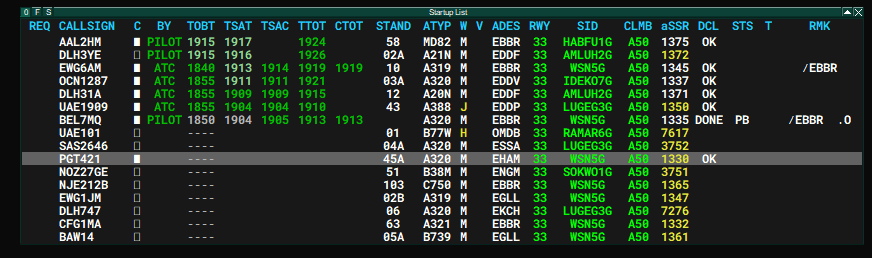
Pilot sets TOBT
This is the preferred method as it allows maximum predictability for the pilot and ATC.
The pilot enters his TOBT via the VDGS website. This time will automatically be pushed to the controller's start-up list and will activate the calculation of the TSAT and TTOT. The pilot will then also be able to see his TSAT on the website. Using the website is optional but is recommended to avoid as much delay as possible.
ATC sets TOBT
Another way of reporting the TOBT is by the pilot reporting ready on the frequency. The pilot will call ATC as soon as ready for start-up and pushback. ATC will then left-lick on the TOBT to set the TOBT to the current time. This will trigger the calculation of the TSAT and TTOT.
Start-Up Approval
Important: Start-Up shall only be approved within a time frame of -5 to +5 minutes to the TSAT!
In the start-up list, TSATs will show in different colours depending on their status:
|
TSAT more than -5 Minutes = Wait for start-up approval |
TSAT within -5 to +5 window = Issue start-up approval |
TSAT approaching +5 = TSAT expires |
Examples:
- DLH31A: TSAT dark green = TSAT within -5/+5 window = "start-up approved, contact Apron ..."
- EWG6AM: TSAT light green = TSAT outside -5/+5 window = "TSAT 1913, standby"
Once the TSAT of EWG6AM turns dark green, ATC calls back the pilot and approves start-up.
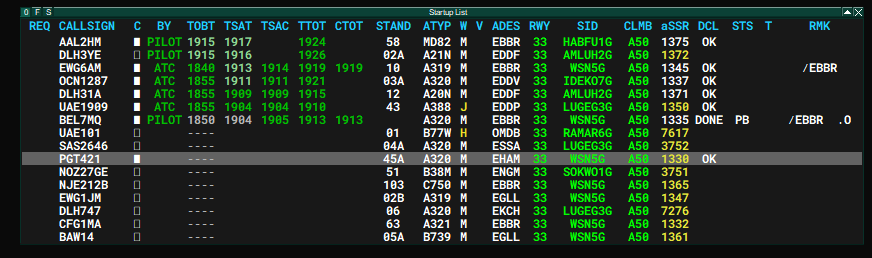
To keep a better track of the communicated TSATs, the TSAT can be entered into the TSAC column (Target Start-Up Time Communicated) by left-clicking on the column. In case the TSAT improves or worsens by more than 5 minutes, the TSAC will turn organge indicating that ATC should inform the pilot about the changes.
ATC should inform the pilot about any changes to the TSAT by more than 5 minutes.
Special Procedures
The following drop-down menus will explain certain special procedures. Expand to get more detailed information:
Calculated Take-Off Times (CTOT)
CTOTs
CTOTs will be issued when enroute capacity or arrival aerodrome capacity is limited (see ATFCM). In this case, the TSAT will be calculated in accordance with the CTOT. At A-CDM aerodromes, the CTOT will only be calculated when setting a TOBT. Remember that CTOTs can worsen/improve as they are reliant on the actual traffic flow on the Vatsim network.
A CTOT is valid -5 to +10 minutes. ATC shall make sure to prioritise traffic with CTOT to avoid loosing enroute slots (e.g. by using separate holding points for aircraft with a CTOT vs. aicraft without CTOT).
It is really important to adhere to CTOTs as these times help to regulate en route traffic across multiple ACCs, thus having a network-wide impact.
To allow GND and TWR to have a better overview of the CTOTs, Delivery should write the CTOT in the remarks (e.g. "/CTOT1919").
Low Visibility Operations
Low visibility operations require a reduced departure rate depending on the runway configuartions as greater separation minima are required.
Use the command ".cdm lvo" to toggle LVO mode on or off. Make sure to select the correct runway configuration in euroscope.
De-Icing Operations
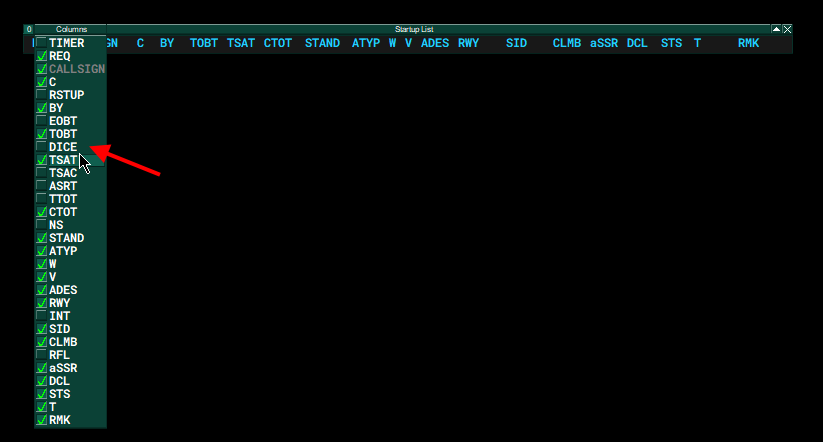
During winter operations, de-icing will result in longer taxi times when using remote de-icing (EDDB). The CDM plugin has a build-in function to take this delay into account.
To get the DEICE function, the controller needs to activate the DEICE collumn by clicking on the litte "F" at the top left of the start-up list.

Performing a Runway Change
- Select the new runways in the runway assignment dialog without removing the old ones.
- Manually change all runways, according to TSAT sequence.
- Once all aircraft have already the new runways, remove the old ones in the runway assignment dialog.
Note: Consider, that traffic for the new runway cannot depart immediately as Tower needs to wait for landing traffic on the old runways. Coordinate with Tower an estimated take-off time for the first aircraft departing on the new runway. Use this time to calculate your custom departure delay.
Command for custom departure delay:
- .cdm departuredelay {airport}/{runway} {time_start}
- Example: .cdm departuredelay EDDB/24L 1345
- This will allow the system to only calculate TTOTs starting earlierst 13:45 UTC
- It will take some seconds until new times are calculated for all aircraft
- It is recommed to use this command after step 1 and before step 2 (see above)
Performing a Controller Change (Shift Change)
- The old controller will change to slave mode by disconnecting as master
- Make sure no master is online
- The new controller will connect as master