Procedures A-CDM Airports (EDDB, EDDH, EDDV, EDDW)
The described procedures are only applied at the following airports: EDDB, EDDH, EDDV, EDDW
Further information:
- General Information A-CDM
- General Information ATFCM
- Procedures at A-CDM aerodromes (EDDB, EDDH, EDDV, EDDW)
- Procedures at non-A-CDM aerodromes (Minor Airports)
- Euroscope Setup
Connection
Master connection is only required for A-CDM Airports (EDDB, EDDH, EDDV and EDDW). Non-A-CDM airports don't need a master connection.
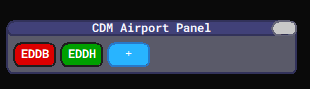
At A-CDM airports (EDDB, EDDH, EDDV, EDDW), the controller responsible for IFR clearances shall connect to the CDM server as master by clicking on the respective ICAO code in the connection menu. Note: Only one Master is allowed at a time.
| Not connected as Master | Establishing connection | Connected as Master | Someone else is the Master |
IFR Clearance
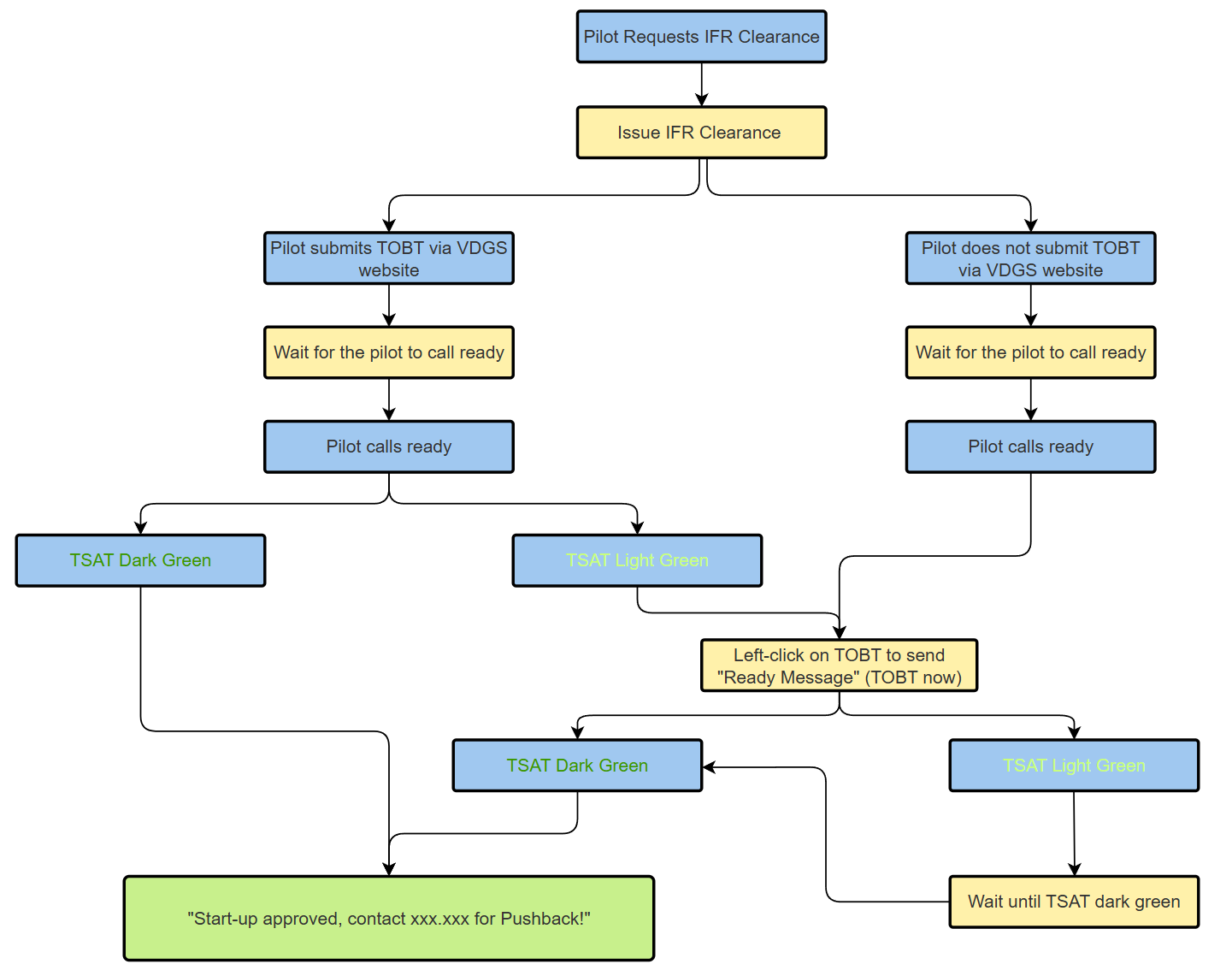
IFR clearance can be given as soon as the pilot requests it, either on the frequency or via DCL.
ATC will issue the IFR Clearance just as normal, with one exception. The phrase “start-up approved” will not be used together with an IFR clearance when using the A-CDM process.
Important: Do not set the start-up ground state after issuing clearance! This should only be done after the pilot has called ready and start-up is approved within the TSAT window.
After the IFR clearance has been issued, we wait for the pilot to call ATC again when ready for start-up (and pushback).
TOBT
The TSAT will be calculated as soon as a TOBT exist. Submitting a TOBT can be done in two ways, as mentioned below. Which method was used can be seen in the column to the leftEOBT of the TOBT.VATSIM
Pilot sets TOBT
Thisplan is the preferred methodused as it allows maximum predictability for the pilotinitial andTOBT. ATC.Pilots
Thethen pilotupdate enters histheir TOBT via the VDGS website. Thisto timeupdate or confirm the TOBT. Confirmed TOBT will automaticallyget behigher pushedpriorities.
VDGS controller'sWebsite
When list and will activate the calculation of the TSAT and TTOT. The pilot will then also be able to see his TSAT on the website. Using the websiteA-CDM is optional,in butuse, it is recommended to avoidinform asthe much delay as possible.
Controllers may choosepilot to advertisesubmit the VDGS website in their controller info ("Submit your TOBT and check your slot at vats.im/VDGS") or via the vATISVDGS NOTAMswebsite page.via the ATIS and controller info.
ATC
The setswhole TOBTsystem
Anotherrelies wayon ofplannability. reportingTherefore, it is highly recommended to use the TOBT"PM" iscolumn byto send an automated private message to pilots informing them about the VDGS website. This should preferably be done if the pilot reportinghas readynot onset a TOBT after receiving IFR clearance.
Whether the frequency. The pilot will call ATC as soon as ready for start-up and pushback. ATC will then left-lick on the TOBT tohas set the TOBT toor not can be seen in the current"BY" time.column This(P will= triggerTOBT theset calculationby ofpilot; theA TSAT= andTOBT TTOT.set by ATC; empty = TOBT not confirmed, no priority granted).
Start-Up Approval
A TSAT will be generated 35 minutes before TOBT. Flights earlier than -35 minutes to TOBT will have a "~" shown in the TSAT column.
It is the responsibility of the pilot to report ready within his start-up approval window. It's not the controller's task to call the pilot initially.
Important: Start-Up shall only be approved within a time frame of -5 to +5 minutes to the TSAT!
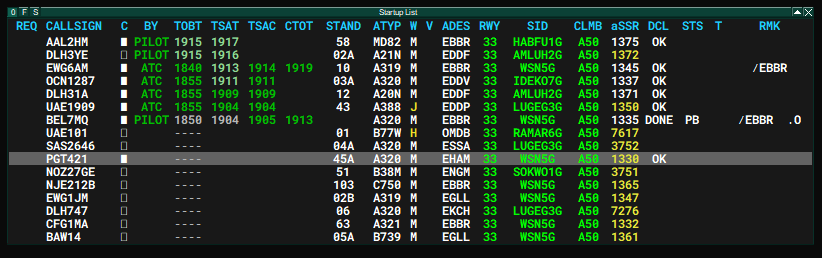
In the start-up list, TSATs will show in different colours depending on their status:
|
TSAT more than -5 Minutes = Wait for start-up approval |
TSAT within -5 to +5 window = Issue start-up approval |
TSAT approaching +5 Minutes = TSAT expires |
Typical Workflow
It is the responsibility of the pilots to set their correct TOBT on their own, just as in real life. Setting the TOBT by ATC should be an exception only (e.g. website faulty, pilot incompetent or no time for an excessive explanation).
|
|
Issue IFR Clearance |
|
| Check if TOBT is set/confirmed by pilot ("BY" column = "P") --> if not use the "PM" column to automatically send VDGS PM to the pilot |
||
|
|
Pilot calls within TSAT
|
The pilot called correctly - Left-Click on TSAT - Issue start-up approval ("start-up approved") |
|
Pilot calls before TSAT (except when the TOBT window is active, see note below) |
The pilot called early - Left-click on ASRT (optional: use REQ column) - Inform the pilot that he needs to update the TOBT via the TOBT website "update your TOBT" |
|
| Pilot calls after TSAT window |
The pilot called late - Left-click on ASRT - Inform the pilot that he needs to update the TOBT via the TOBT website "update your TOBTT" |
|
What to do when the pilot calls early?
Some people tend to be ready earlier than initially planned. In this case, it is the task of the pilot to update the TOBT accordingly.
Exception: TOBT is set correctly to now, but the TSAT window is still in the future due to startup delay. In this case, just advise the pilot about his TSAT.
Once the pilot called in earlier or too late, it is now the controller's responsibility to call the pilot again at TSAT. Therefore, regularly check for open requests within the active startup window.
Examples
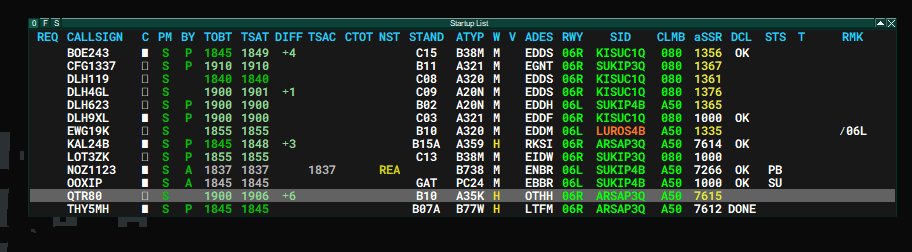
Current time: 1842z
DLH31A:THY5MH requests startup: Within TSAT window (TSAT darkgreen = TSAT withingreen) -5/+5 window =-> "start-up approved, contactApronApron"..."--> left-click on TSAT to set SU ground statusEWG6AM:DLH9XL requests startup: Outside TSATlight(brightgreengreen),=as he called before TOBT --> "please update your TOBT" --> left-click on ASRT --> call him once the TSAToutsideturn-5/+5darkwindow = "TSAT 1913, standby"green
Once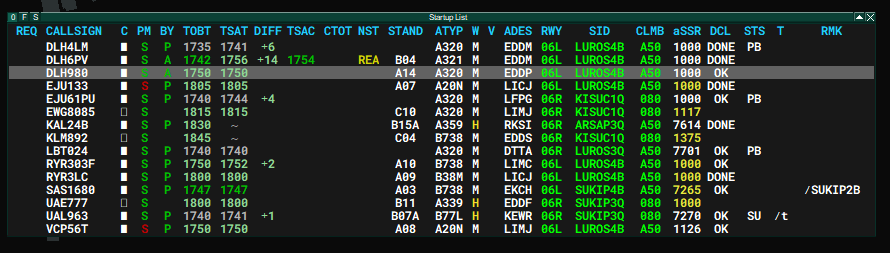
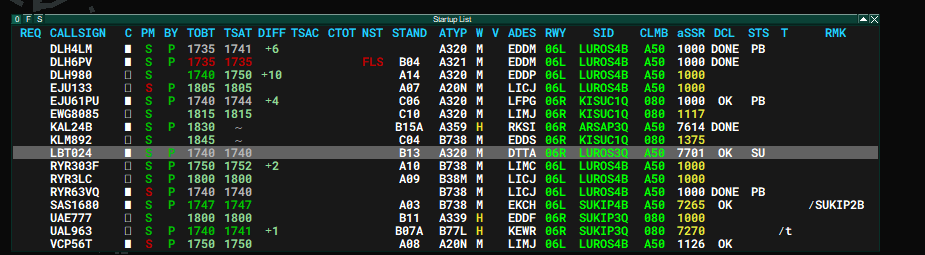
Current time: 1740z
- DLH6PV requests start-up: Outside of TSAT window (bright green), but TOBT is correctly set --> pilot experiences TSAT delay due to runway occupancy --> left-click on ASRT and inform him about TSAT --> call him once the TSAT
of EWG6AM turnsturn darkgreen,green
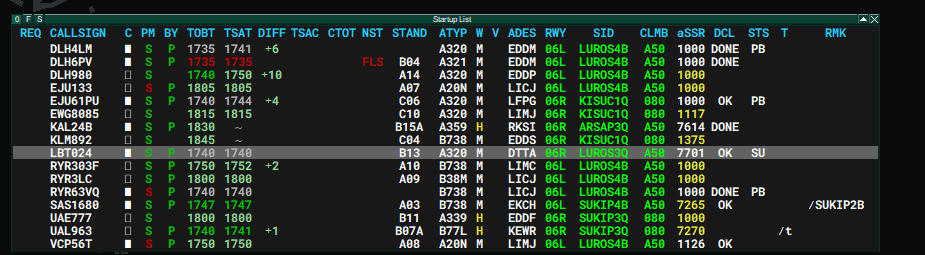
ToCurrent keeptime: a1735z
- DLH6PV
ofrequeststhestart-up:communicatedMissedTSATs,TSAT window (red) --> "please update your TOBT" --> left-click on ASRT --> call him once the TSATwillturn dark greenbe - EJU133
intorequeststheIFRTSACclearance: No TOBT set by pilot ("BY column empty) --> issue IFR clearance --> send VDGS private message (Target"PM"Start-Upcolumn)
ATC should inform the pilot about any changes to the TSAT by more than 5 minutes.
Special Procedures
The following drop-down menus will explain certain special procedures. Expand to get more detailed information:
Calculated Take-Off Times (CTOT)
CTOTs
CTOTs will be issued when enroute capacity or arrival aerodrome capacity is limited (see ATFCM). In this case, the TSAT will be calculated in accordance with the CTOT. At A-CDM aerodromes, the CTOT will only be calculated when setting a TOBT. Remember that CTOTs can worsen/improve as they are reliant on the actual traffic flow on the Vatsim network.
A CTOT is valid -5 to +10 minutes. ATC shall make sure to prioritise traffic with CTOT to avoid loosing enroute slots (e.g. by using separate holding points for aircraft with a CTOT vs. aicraft without CTOT). When workload allows, the Delivery controller may choose to inform the pilot about his CTOT.
It is really important to adhere to CTOTs as these times help to regulate en route traffic across multiple ACCs, thus having a network-wide impact.
To allow GND and TWR to have a better overview of the CTOTs, Delivery should write the CTOT in the remarks (e.g. ".C1919"). This can also be done by using the .cdm rmkctot command.
REA Message
Whenever the pilot has received a CTOT, a REA MSG can be sent to the system once the pilot has reported ready. This will lock the CTOT and allow improvement. The CTOT will never get worse when the REA MSG is set. The REA MSG can be set:
- Setting TOBT to now
- Left-Clicking on TSAT, CTOT or the REA column
- Pilot set REA himself via the VDGS website
Low Visibility Operations
Low visibility operations require a reduced departure rate depending on the runway configuartions as greater separation minima are required.
Use the command ".cdm lvo" to toggle LVO mode on or off. Make sure to select the correct runway configuration in euroscope.
De-Icing Operations
During winter operations, de-icing will result in longer taxi times when using remote de-icing (EDDB). The CDM plugin has a built-in function to take this delay into account.
To get the DEICE function, the controller needs to activate the DEICE column by clicking on the little "F" at the top left of the start-up list.

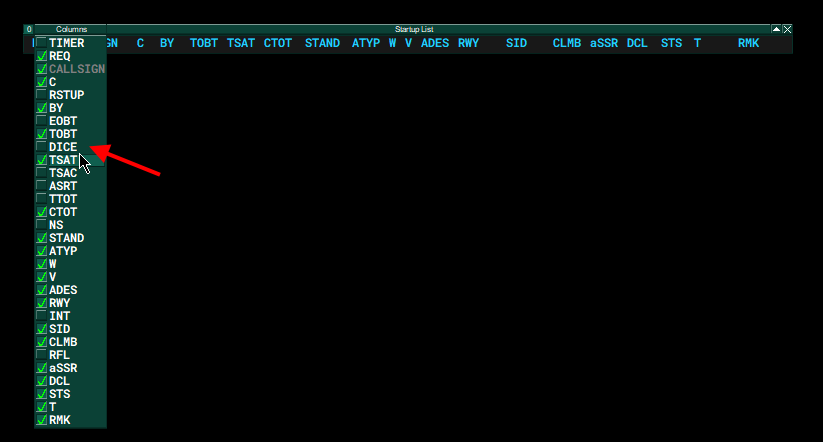
In this collunm ATC can select a de-icing pad (or on-stand de-icing). This will then add extra minutes to the regular taxi time.
In the screenshot below, you can see that KLM1780 and DLH5AR both requested de-icing at a remote de-icing facility. As this will make the taxi time significantly longer compared to aciraft not requiring de-icing, both KLM1780 and DLH5AR are already allowed to start-up even though DLH7WA has an earlier TTOT.
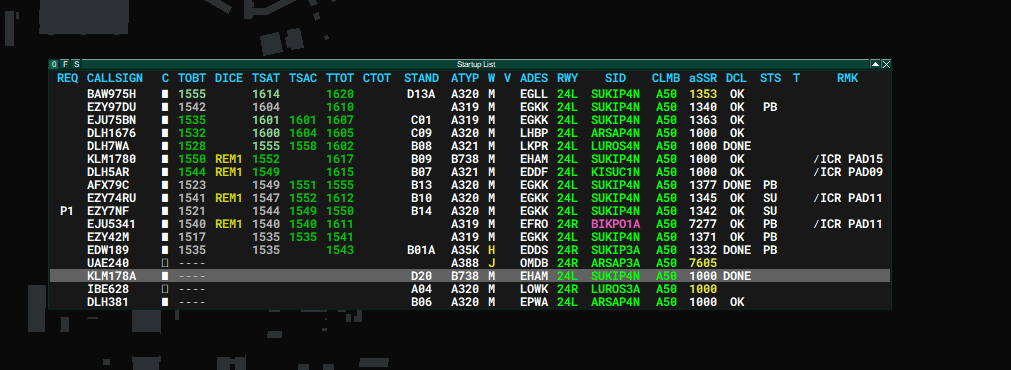
Setting the de-icing status is quite important as this will factor in longer taxi times, thus allowing better prediction of the RWY usage. Additionally, this also allows better calculation of CTOTs as aircraft requiring de-icing could lose their slot due to the longer taxi time.
Performing a Runway Change
- Select the new runways in the runway assignment dialog without removing the old ones.
- Manually change all runways, according to TSAT sequence.
- Once all aircraft have already the new runways, remove the old ones in the runway assignment dialog.
Note: Consider, that traffic for the new runway cannot depart immediately as Tower needs to wait for landing traffic on the old runways. Coordinate with Tower an estimated take-off time for the first aircraft departing on the new runway. Use this time to calculate your custom departure delay.
Command for custom departure delay:
- .cdm departuredelay {airport}/{runway} {time_start}
- Example: .cdm departuredelay EDDB/24L 1345
- This will allow the system to only calculate TTOTs starting earlierst 13:45 UTC
- It will take some seconds until new times are calculated for all aircraft
- It is recommed to use this command after step 1 and before step 2 (see above)
Performing a Controller Change (Shift Change)
- The old controller will change to slave mode by disconnecting as master
- Make sure no master is online
- The new controller will connect as master
CDM Plugin Commands
.cdm startupdelay {airport}/{runway} {time_start}- Sets a time where the earliest TSAT can start (e.g.
.cdm startupdelay EDDB/24L 1100= earliest TSAT at 11:00 UTC)
- Sets a time where the earliest TSAT can start (e.g.
.cdm departuredelay {airport}/{runway} {time_start}- Sets a time where the earliest TTOT can start (e.g.
.cdm departuredelay EDDB/24L 1100= earliest TTOT at 11:00 UTC)
- Sets a time where the earliest TTOT can start (e.g.
.cdm lvo- Toggles Low Visibility Operation ON or OFF.
.cdm remarks- Toggle set TSAT to Euroscope scratchpad ON or OFF
.cdm rmkctot- Toggle set CTOT to Euroscope scratchpad ON or OFF
.cdm recover- In case of of CTD, it tries to recover the latest time status backed up in the server. Example:
.cdm recover EDDB)
- In case of of CTD, it tries to recover the latest time status backed up in the server. Example:
.cdm help- Sends a message with the available commands.
Video
WIP
Procedure Flow Chart