
ACDM for ATC
A small quiz to get comfortable with the ACDM process is available here. No personal data will be stored.
Connection
The station doing the Delivery duties at an ACDM airport (EDDF, EDDL, EDDS, EDDK) has to connect as Master for the CDM plugin, using the CDM Airport Panel. It is only possible to have one master connection at the time.

| Not connected as Master | Establishing connection | Connected as Master | Someone else is the Master |
When another controller is taking over, the current Master needs to disconnect the ACDM tool, by left-clicking the active Airport.
Instead of using the panel, the commands ".cdm master {icao}" and ".cdm slave {icao} are also possible and have the same function.
In case of a Euroscope crash the command ".cdm recover {icao}" shall be used!
ACDM Handling as ATC
Upon connection, the ACDM "real mode" is ON by default. In that case, the EOBT from the Vatsim flightplan is used as the initial TOBT in the ACDM tool (it might not be really accurate though because a lot of pilots just take the Simbrief suggestion).
Even with real mode ON, pilots can still enter their TOBT by using the website. This grants them higher priority in case of delay compared to pilots who have not inserted a TOBT on the website.
In the "SETBY" column, you can see whether a pilot / ATC has actually set a TOBT manually.
Based on the TOBT, a TSAT will be generated (only when the TOBT is within the next 35 minutes). If there is no delay at the departure airport and the aircraft has no slot (CTOT), the TSAT is the same as the TOBT.
To prevent misunderstandings, do not use the word "slot" for TOBTs or TSATs in radio telephony / coordination . A slot always stands for the CTOT, so if an aircraft has no CTOT, there is no "slot" for that aircraft.
It is recommended to sort the Startup List by the clearance flag (left click on the "C" on top of the list - this will sort the callsigns alphabetically after who has received clearance).
If you are staffing the Delivery position, it is recommended to use both the Startup List for ACDM (sorted by TSAT) and the Departure List for IFR Clearances (sorted by clearance flag which sorts it also alphabetically).
Attention Euroscope bug: If an inbound starts another flight as an outbound with the same callsign and without reconnecting, this new outbound flight is not shown in the Startup list but only in the Departure list until you remove the "ONB" (onblock) status from it.
Typical Outbound flow
General idea: We as ATC want to train pilots to set their correct TOBT on their own, just as in real life. Setting the TOBT by ATC should be an exception only (e.g. website faulty, pilot incompetent or no time for an excessive explanation).
| Pilot requests IFR clearance | Pilot requests startup |
||
|
Issue IFR Clearance & set clearance flag |
Earlier than ~3 minutes before TSAT window begins or... |
Less than ~3 minutes before TSAT window begins |
TSAT ± 5 minutes (=within TSAT window) |
| ...after TSAT + 5 minutes (TSAT window expired) | |||
|
„Please update your TOBT on the website in the ATIS, (then I will call you accordingly)“
Exception: TOBT is set correctly to now but TSAT window is still in the future due to startup delay. In this case, just advise the pilot about his TSAT.
Optional: Send PM, by left clicking SETBY
Left click on ASRT (optional: REQ column -> Request startup) as a reminder for ATC that the pilot would be ready) |
“Roger, I will call you in … minutes according to your TSAT”
Left click on ASRT (optional: REQ column -> Request startup) as a reminder for ATC that the pilot would be ready) (This should be done when the benefit of updating the TOBT on the website is not given, because the TSAT window is about to begin.) |
Issue startup clearance
Left click on TSAT to set the SUG status
(When controlling top-down, you can directly set pushback status)
If pilot has a CTOT, it is recommended to advise him: "Your CTOT is XXXX" so that he is aware |
|
|
Important: It is now your responsibility to issue startup as soon as the pilot has updated the TOBT and/or his TSAT window has started. Therefore, you should regularly check the Startup List for open requests. |
|||
If the pilot is not able to change the TOBT himself (e.g. lack of competency, already reached TOBT update limit (3 times) or the website is not working properly), update the TOBT yourself by right clicking on the TOBT. This will set the TOBT to now, which will generate a TSAT to be used by ATC. Alternatively, with a left click on the TOBT you can enter any TOBT the pilot tells you.
Practical Examples
 Current time: 0012z
- OCN23F is requesting startup. He is within his TSAT window (TSAT +/-5 minutes) - TSAT dark green - so startup can be given.
- DLH6VA is requesting startup. His TOBT is still way in the future. You should tell the pilot to update his TOBT on the website in the ATIS. Alternatively, it would also be possible to set the TOBT to now by right clicking on the TOBT but this would not teach the pilot that he is responsible for his TOBT.
- If he does not understand, send him the PM. If he still struggles with setting the correct time, just help him by setting the TOBT to now with a right click on the TOBT. Then, the TSAT will also refresh and you can probably give him startup.
 Current time: 0157z
- AAR542 is requesting startup. Since there are only 3 minutes remaining until his startup window begins (remember: the window begins 5 minutes before TSAT so here at 0200z), it would not really be a benefit to explain the pilot to update his TOBT on the website. Instead, you should advise him: "I will call you in 3 minutes according to your TSAT".
- CFG6LT is requesting startup. He missed his TSAT window so you should tell the pilot to update his TOBT on the website in the ATIS. Alternitavely, it would also be possible to set the TOBT to now by right clicking on the TOBT but this would not teach the pilot that he is responsible for his TOBT.
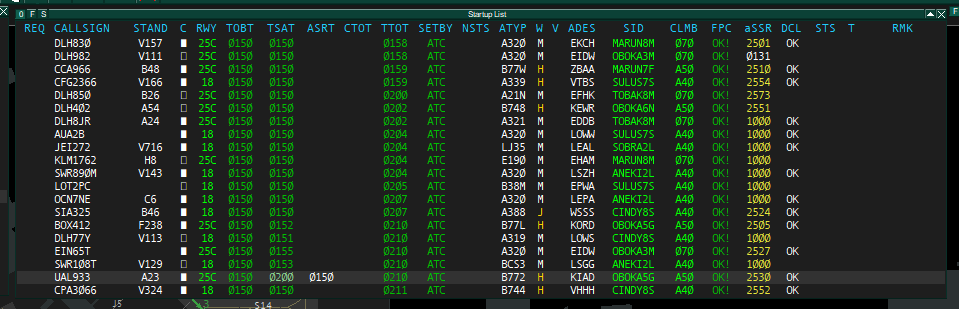 Current time: 0150z
- UAL933 is requesting startup. His TOBT is now but because of the high outbound demand, his TSAT is delayed to 0200. So in this case, changing the TOBT will not improve the TSAT (see also paragraph below). The pilot just has to wait until his TSAT window begins (5 minutes before TSAT). Therefore, click on the ASRT and tell the pilot: "I will call you at time 0155 / in 5 minutes according to your TSAT".
High traffic / delay situations
When there is startup-delay and the TOBT has already passed but the TSAT is still in the future, updating the TOBT to now will not improve the TSAT. In this case just tell the pilot "I call you for startup according to your TSAT in ... minutes / at time ...").
Additionally, right click on ASRT. This also generates a REA (ready message) which prevents that the TSAT will be delayed further.
The ACDM process does not track the actual amount of traffic still on the ground. With pushback and/or departure delay, manual startup delay need to be added. It is recommended to monitor the vSID Startup Counter (.vsid menu) to monitor the traffic situation at the airport. The maximum number of startups per runway should normally not be exceeded (exceptions see below).
When it's getting more crowded, event EXOTs (taxi times) should be activated (".cdm event") to buffer pushback and taxi delays! Don‘t forget to deactivate it when there is no delay anymore!
In case the number for maximum startups for one runway reaches their limit, the controller can delay startup clearance within the TSAT window:
Pilot: DLH3FA request startup.
ATC: DLH3FA roger, I will call you according TSAT
ATC: DLH3FA roger, I will call you at TSAT + 5
BMI monitoring and capacity adjustment
The ACDM plugin knows the maximum capacity per 10-minute-window for each runway. For example, runway 25C at EDDF has a capacity of 4 outbounds per 10-minute-window.
The plugin then calculates a TTOT (Target Takeoff Time - the time when an aircraft will be on the runway) for every flight based on the TSAT + the estimated taxi time. When more aircraft would have a TTOT within a specific 10-minute-window than capacity allows, some of them will get a later TSAT so that the TTOT gets delayed as well.
The capacity and demand can be monitored in the BMI monitoring window. To open it, the CDM master has to do a middle-click on his airport in the ACDM panel.
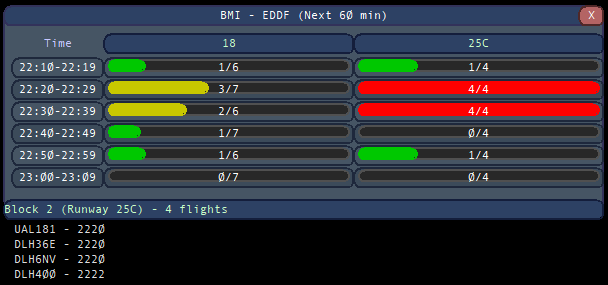
BMI monitoring window. You can see the capacity and the demand per 10-minnutes-window for every runway. By middle-clicking on a specific block, you can also see the aircraft which have their TTOT within this 10-minute-window.
However, these default capacities are not necessarily the best values in every possible situation. Practical example:
 Here we have a group flight from EDDF to EDDB and everyone wants to depart at the same time from RWY 25C. Two of the pilots get TSAT delay of up to 10 minutes because the plugin calculates that too many aircraft would be on the holding point at the same time.
ATC can now consider: Is the TSAT delay really necessary? If the airport is pretty empty apart from the group flight, it could be an idea to temporarily increase the capacity for a runway. As we can see, RWY 18 is way below its limit and RWY 25C is only crowded because of the group flight. We should also look on the ground radar, how busy the apron is. In this case, we see that it not really busy, so it would be reasonable to increase the RWY 25C capacity to avoid delay for the group flight pilots.
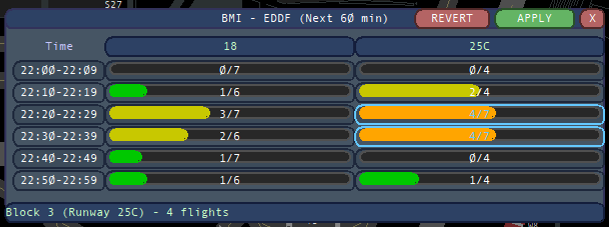
To increase / decrease the capacity, simply left-click (decrease) or right-click (increase) the specific block (10-minute-window) you want to change. In this example, two 10-minute-blocks on RWY 25C are increased to 7 outbounds instead of 4. After that, click on "Apply". It might take a few seconds and during this short time, the TSATs might be shifting randomly.
 After the capacity change was applied and the plugin recalculated everything, all the departures which had TSAT delay before, don't have TSAT delay anymore now.
Use the capacity adjustment tool with caution and common sense. Increasing the capacity usually only makes sense if the airport is still way below its capacity limits. Otherwise, the departures are either stuck at the apron or at the holding point where they burn much more fuel.
Top-Down Service with ACDM
ACDM should be used for top-down service whenever workload permits.
If it is very busy, pilots should not be asked for TOBTs directly. Once the outbound aircraft is ready, the TOBT should simply be set to the current time. ACDM should not be used when controllers are overloaded with a high volume of traffic. In such situations, maintaining safe and manageable operations must remain the priority.
Try to follow the CTOTs as closely as possible to support efficient traffic flow management within the enroute area.
Pushback and Startup by one single controller
When controlling Top-Down and pushback is not possible within the TSAT window because of other blocking traffic, you should still label SUG (Startup status) and the pushback request. Otherwise, the TSAT could expire and you would need to give Startup after the TSAT window which is against the ACDM philosophy.
Clickspots Euroscope

The Startup list has all required items displayed by default. For the Departure list only the CTOT is displayed by default. All further items need to be displayed manually via the Filter.
| Item | left click | right click |
| TOBT | edit TOBT | set TOBT now + ASRT + REA status |
| TSAT | SUG status | toggle ASRT + REA status |
| ASRT | toggle ASRT | toggle ASRT + REA status |
| CTOT | add CTOT as CTOC | toggle ASRT + REA status |
| ASAT | -- | -- |
| TTOT | -- | -- |
| OBT | TOBT Options (ACDM Airport) | EOBT Options (non ACDM Airport) |
| Item | description | left click |
| EOBT | pilot filed EOBT | EOBT Options |
| CTOC | CTOT Communicated | CTOC Options |
| PM | VDGS link via private message | send PM with vats.im/vdgs link |
| SETBY | TOBT set by ATC/Pilot | send PM with vats.im/vdgs link |
| NSTS | Network Status (REA/FLS) | Network Status Options |
| FLOW | restricting airport/sector | get flow message as text |
Items not displayed by default can be activated with the list filter "F".
Network Status
The following network status will be displayed within the NSTS Item.
| Status | description |
| REA | Ready status is sent for CTOT improvements |
| FLS-CDM | Flight Suspension when TSAT Window is missed (ACDM Airport only) |
| FLS-NRA | Flight Suspension, not reported airborne (missed TTOT based on EOBT) |
| FLS-MR |
Flight Suspension due to Mandatory Route => check ECFMP Discord Channel for require route |
| FLS-GS | Flight Suspension due to Ground Stop |
| FLS-P | Flight Suspension due to a prohibiting rule (e.g. prohibited waypoint) |
Colors
The following colors are used for the different items within the Tower PHX Profil.
| Item | Item Color |
||||
| TOBT | before TOBT -5 | after TOBT -5 | Flight Suspension | ||
| TSAT | TOBT -35 to TSAT -5 |
first minute of TSAT window |
TSAT ± 5 | last minute of TSAT window | after TSAT + 6 |
| CTOT | CTOT by ATFCM | ||||
| CTOC | CTOT improvement | CTOT worsening | CTOT canceled | CTOT ± 5 | |
| TTOT | before TTOT + 10 | after TTOT + 10 | |||
| NSTS | REA (ready message) |
FLS (Flight Suspension) |
|||
Coordinator Duties
Delivery Coordinator should not connect as Master. All ACDM handling in Euroscope is done by Delivery itself!
Coordinator should monitor and work the vIFF Dashboard on vats.im/atm for ACDM and flow duties!
Airport Default Capacities
Each ACDM Airport has default runway capacities. Frankfurt and Düsseldorf always have the maximum amount of traffic set the airport can handle. For Stuttgart and Köln the capacity is balanced between inbound and outbound traffic. It needs to be adjusted on the current traffic situation if required.
Capacities can be modified via the vIFF website (vats.im/atm).
| EDDF |
EDDL |
EDDK / EDDS | |||
|
OUT 18: OUT 07C/07R: OUT 25C/25L: |
36/h 36/h 24/h |
OUT Single RWY: OUT Dual RWY: |
26/h 32/h |
max. TOTAL: OUT: |
48/h 24/h |
| INB: | 58/h | INB DUAL: | 30/h | INB: | 24/h |
ACDM at Minor Airports
The ACDM process ist not used at minor airports. Do not connect as Master!
CTOTs are calculated based on the filed EOBT with a standard taxi time. All outbounds shall comply with CTOTs.
REA Message
Whenever the pilot has received a CTOT, a REA MSG can be sent to the system once the pilot has reported ready. This will lock the CTOT and allow improvements. The CTOT will never get worse when the REA MSG is set.
In case the outbound missed the CTOT, a new EOBT (right click on OBT in the DEP list) need to be set in the flightplan.
CDM Plugin Commands
The following plugin commands are the most important commands during daily operations.
| ACDM Commands | |
| .cdm startupdelay {icao}/{rwy} {start_time} | Startup delay, next TSAT at a specific time |
| .cdm LVO | toggle LVO rates |
| .cdm event | toggle event (high traffic) taxi times |
| .cdm rmkctot | toggle set ".Cxxxx" as CTOT in the ES Remarks (already ON by default |
| .cdm realmode | toggle real mode (EOBT used as initial TOBT with lower prio) (already ON by default) |
| Plugin Commands | |
| .cdm master {icao} | Master Mode (can be done via the graphical panel as well) |
| .cdm slave {icao} | Slave Mode (can be done via the graphical panel as well) |
| .cdm recover {icao} | used after CTD |
| .cdm panel | Airport panel |
| .cdm atfcm | ATFCM panel |
| .cdm help | display all commands |